Beyond Generic Forms: How Industry-Specific Templates Transform Business Data Collection
.png&w=3840&q=75)
Business IT leaders face a common challenge: collecting structured data from employees, customers, and partners without building custom applications or relying on limited tools like Microsoft Forms. SOS Intake from SnapOn Software addresses this with purpose-built templates that connect directly to Microsoft 365 and Salesforce, offering capabilities that generic form builders simply cannot match. This series explores five industry-specific templates that demonstrate how ready-made solutions can accelerate deployment while maintaining enterprise-grade functionality.
When incidents occur, response time determines impact. The Incident Reporting Template captures complete incident details with evidence and timestamps, flowing directly into case management systems.
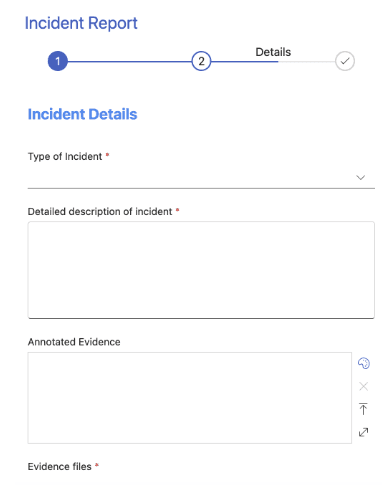
Incident management effectiveness depends on the quality and completeness of initial reports, yet many organizations still rely on email-based reporting or generic forms that miss critical details. When incidents are reported through email, essential information like precise timestamps, structured categorization, and supporting evidence often gets lost in unstructured text. Generic form tools like Microsoft Forms can collect basic incident information but lack the file upload capabilities, conditional logic, and system integration that incident management requires.
The Incident Reporting Template captures comprehensive incident information through structured fields designed for both in-person and technology incidents. The template includes incident classification with type selection covering IT, security, safety, operational, HR, and facilities incidents, severity level categorization from low to critical, and detailed category and subcategory options for proper routing. The incident details section provides space for comprehensive description of what happened, impact assessment identifying who or what is affected, actions taken before reporting, and current status with immediate risk evaluation.
Supporting evidence capabilities distinguish this template from basic form tools. The platform enables photo uploads of physical incidents, screenshots of system errors, log files or error messages, video evidence when applicable, and related documentation. Unlike Microsoft Forms, which has file size limitations and limited file type support, SOS Intake handles multiple large files with configurable file type controls for security. The platform's geolocation support allows incident reporters to capture precise location data, particularly valuable for organizations with multiple facilities or distributed infrastructure.

Direct integration with case management systems transforms incident reports from isolated form submissions into actionable workflows. When connected to Salesforce, incidents automatically create Case records with proper categorization, trigger assignment rules based on incident type and severity, initiate escalation workflows for critical incidents, and link to affected accounts or assets. For Microsoft 365 environments, incidents create items in SharePoint incident tracking lists, trigger Power Automate workflows for notifications, alert Teams channels based on severity, and feed incident dashboards in real-time. This integration eliminates the manual ticket creation that wastes valuable response time during incidents.
For IT leaders implementing incident management processes, SOS Intake supports established frameworks including ITIL Incident Management with structured incident capture feeding ITSM tools, OSHA reporting for workplace safety incident documentation, ISO 27001 for information security incident response, and business continuity planning for disruption reporting and tracking. The template can be customized with organization-specific incident types and categories, conditional logic for incident-specific questions.
About the Author
Peter Baddeley
Director, Sales and Client Solution