The SharePoint Forms Showdown: How SnapOn Software Stacks Up Against the Competition

Microsoft's retirement of InfoPath on July 14, 2026 didn't just close a chapter — it forced thousands of organizations to finally ask the question they'd been avoiding for years: what do we actually use for SharePoint forms?
The market responded with a crowded field of options. Some are expensive, some are limited, and some require a developer on speed dial just to change a field label. This post breaks down the four most common types of solutions organizations evaluate and shows you where SnapOn Software's no-code forms solution stands in each comparison.
Competitor 1: "The Platform Giant"
Who it is: The most visible option in the Microsoft 365 ecosystem, Power Apps. It's built by Microsoft, ships with most enterprise licenses, and on the surface looks like the obvious path forward from InfoPath.
What it does well:
- Deep integration across the Microsoft stack
- Highly flexible — you can build almost anything
- Included with many enterprise Microsoft 365 licences (base version)
Where it falls short:
Powerful flexibility comes at a cost. While this platform can be used to build sophisticated business applications, it often requires significant technical expertise, longer development timelines, and ongoing maintenance.
What begins as a "free" option frequently becomes dependent on developers or Power Platform specialists to build, maintain, and update even moderately complex forms.
There is also no straightforward way to dynamically enable or disable fields based on user selections without additional development. Every customization adds to a backlog that typically requires technical resources to resolve.
SnapOn Software advantage:
SnapOn Software's no-code forms solution empowers business users to create secure, responsive forms without relying on IT or developers. Teams can build, manage, and update their own forms while reducing implementation time and overall cost.
Competitor 2: "The Built-in Basic"
Who it is: Microsoft's lightweight survey tool, Microsoft Forms, that's included with every Microsoft 365 subscription. Many organizations default to it simply because it's already available.
What it does well:
- No additional licensing cost
- Extremely easy to use
- Excellent for surveys, quizzes, and simple data collection
Where it falls short:
This tool was never designed to replace InfoPath. It works well for basic forms but lacks the workflow, automation, integrations, and customization required for more complex business processes.
If your form requires conditional logic, multi-stage approvals, SharePoint integration, document workflows, or advanced business rules, you'll quickly reach its limits.
SnapOn Software advantage:
SnapOn Software's no-code forms solution supports everything from simple forms to sophisticated approval processes while remaining fully integrated with SharePoint and Microsoft Teams.
Competitor 3: "The Enterprise Automation Platform"
Who it is: A mature forms and workflow platform that's been part of the SharePoint ecosystem for many years. It's often evaluated by organizations replacing both InfoPath forms and legacy workflow solutions.
What it does well:
- Mature, feature-rich platform
- Strong reputation in regulated industries
- Combines forms and workflow automation in one solution
Where it falls short:
For many organizations, cost becomes the deciding factor.
Complex licensing models, multiple product tiers, workflow-based pricing, and longer implementation timelines can make this type of platform difficult to justify for organizations whose primary need is modern SharePoint forms.
SnapOn Software advantage:
SnapOn Software's no-code forms solution provides modern SharePoint-native forms without the cost or complexity of a full enterprise process automation platform. Data remains within your Microsoft 365 tenant, and organizations can significantly reduce development time without sacrificing capability.
Competitor 4: "The Regulated Industry Specialist"
Who it is: A SharePoint-native forms and workflow platform designed primarily to help organizations migrate from InfoPath, particularly in highly regulated industries.
What it does well:
- Familiar experience for former InfoPath users
- Strong presence in government, healthcare, and regulated sectors
- SharePoint-native architecture keeps data within the Microsoft tenant
Where it falls short:
This type of platform excels at recreating legacy InfoPath experiences but is less focused on enabling modern Microsoft 365 collaboration.
Organizations looking for cloud-first, business-user-friendly experiences may find the platform centred more on migration than innovation.
SnapOn Software advantage:
SnapOn Software's no-code forms solution is designed for today's Microsoft 365 workplace, instead of simply to replace InfoPath. With dynamic forms, intelligent logic, Microsoft Teams integration, and a true no-code experience, business users can build and manage solutions without relying on IT.
The Bottom Line
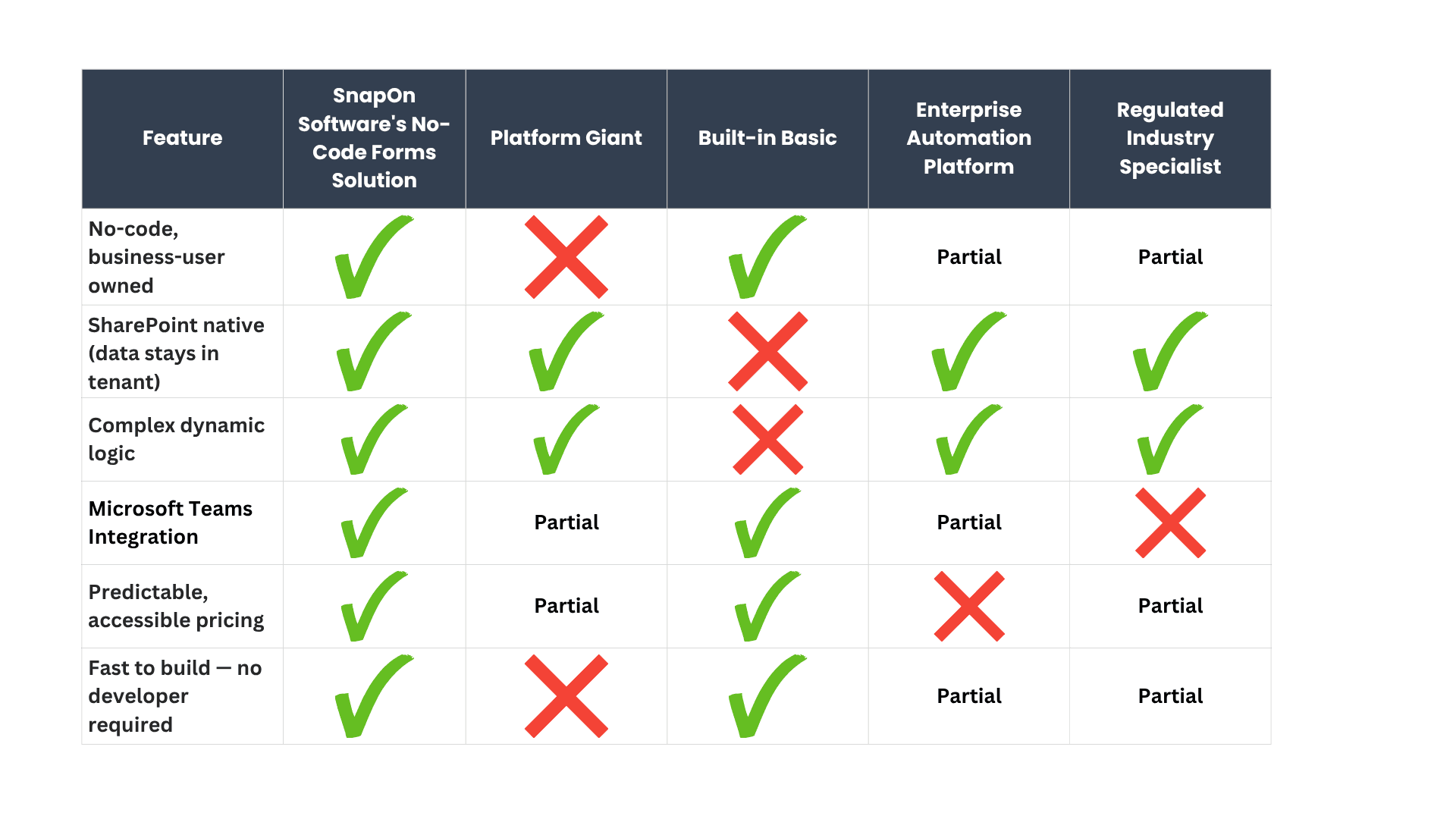
Every organization's Microsoft 365 investment deserves forms that are as intelligent, dynamic, and easy to use as the platform they live on. The alternatives reviewed here each have strengths—but each requires a trade-off, whether that's cost, complexity, technical resources, or functionality.
SnapOn Software's no-code forms solution is designed to eliminate those compromises.
Ready to see the difference? Request a demo → https://www.snapon-software.com/products/collaboration-and-productivity/forms
About the Author
Peter Baddeley