How to Automate Microsoft 365 Provisioning

Reduce Inconsistency, Permission Sprawl, and Delays with Governed Automation
Manual Microsoft 365 setup can work when your organisation has only a handful of Teams, SharePoint sites, and Microsoft 365 Groups. As collaboration scales, manual provisioning often becomes a source of inconsistency, delays, unclear ownership, and oversharing-all of which increase IT tickets and governance risk.
Microsoft 365 provisioning automation addresses this by turning workspace creation into a repeatable, policy-aligned process. Instead of relying on one-off admin actions, your organisation can standardise how new workspaces are requested, approved, created, and managed throughout their lifecycle.
SnapOn Software's products, ProvisionPoint and Audit, support this approach in two complementary ways:
- ProvisionPoint helps you apply guardrails at the moment a workspace is created (request, approval, template, naming, ownership, and initial access settings).
- Audit helps you maintain visibility after creation (monitoring and reporting on access, sharing, and activity across Microsoft 365).
Why Manual Microsoft 365 Provisioning Creates Risk
Every new Team, SharePoint site, group, or collaboration space needs decisions: who owns it, what template should be used, which permissions apply, whether guests are allowed, what naming convention should be followed, and when the workspace should be reviewed or retired.
When those decisions are made manually, outcomes vary from one request to the next. Some workspaces are created with the right owners and metadata. Others are created quickly to unblock a project, but without the structure needed for long-term governance. Over time, this can lead to:
- Too many workspaces with unclear ownership
- Inconsistent naming and classification
- Overshared sites and files
- Guest access that is difficult to review
- Abandoned Teams and SharePoint sites
- Repetitive IT requests for standard workspace creation
- Limited visibility for compliance and security teams
The Goal: Self-Service with Guardrails
Provisioning automation is most effective when it balances speed and control. Users need a clear, approved route to request the resources they need. IT and governance teams need consistent structure, predictable configuration, and a way to prevent common risk patterns (for example, overly broad membership, guest access enabled by default, or missing ownership).
ProvisionPoint is designed to enable self-service provisioning for Microsoft Teams, SharePoint Sites, Microsoft 365 Groups, Planner Plans, and Viva Engage Communities, while allowing administrators to define governance rules that apply consistently.
What ProvisionPoint automates (and why it matters)
At a practical level, most provisioning pain comes from repeatable work performed inconsistently: collecting the right information, applying the correct template, assigning owners, and configuring access. ProvisionPoint is built to streamline these steps so that workspace creation follows a defined pattern rather than ad hoc admin activity.
ProvisionPoint can Support:
- Workspace requests: a standard intake path for new Teams, SharePoint sites, Microsoft 365 Groups, and related resources.
- Standardised templates: consistent structures aligned to your organisation's patterns (for example: required channels/libraries, metadata, and baseline configuration).
- Governance policies: rules around naming, ownership, access, classification, and lifecycle expectations.
- Approvals where needed: ability to route higher-risk requests for review while allowing lower-risk requests to proceed with guardrails.
- Centralised management: a single place to manage common provisioning and governance actions across Teams, SharePoint, and Microsoft 365 Groups.
How an Automated Provisioning Workflow Typically Works
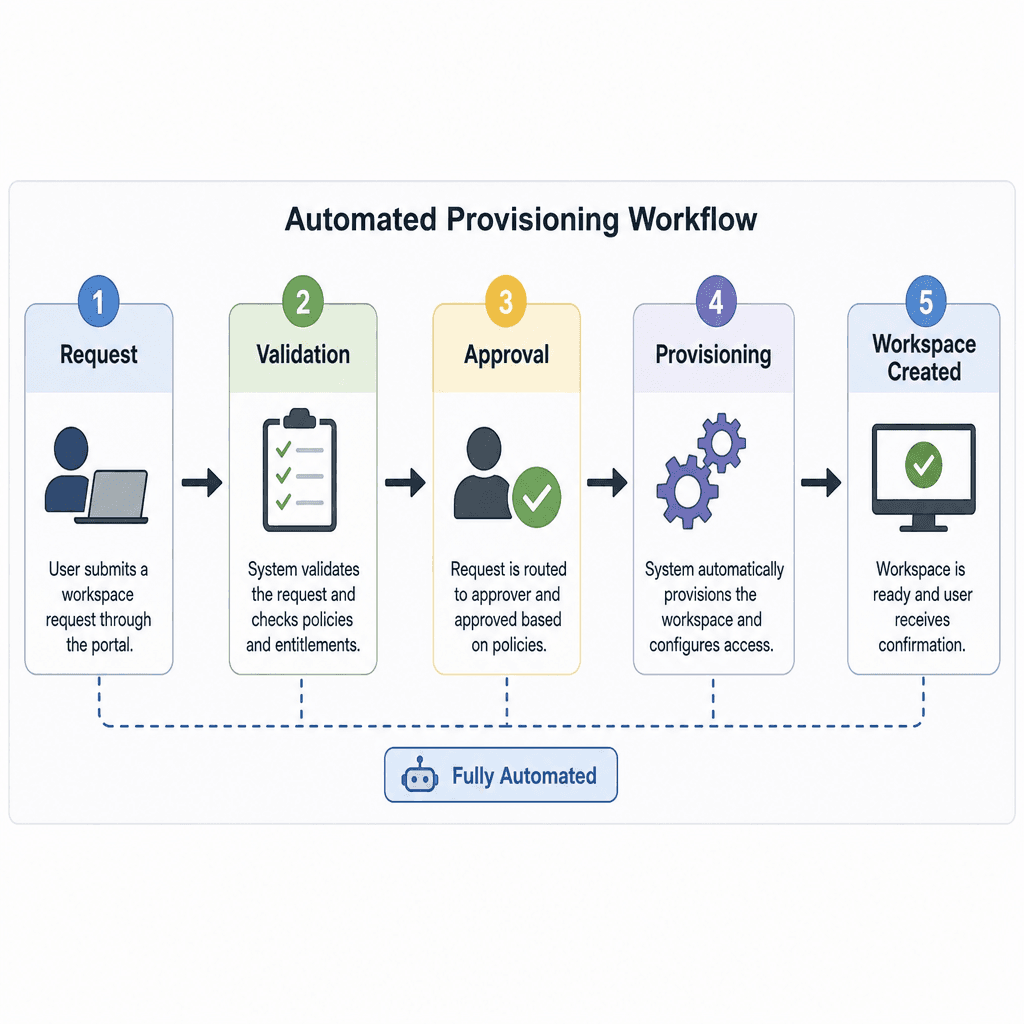
Provisioning automation is not only about creating the workspace-it is about making sure the correct decisions are captured and enforced. A typical governed flow includes:
- Request submission The requester selects the type of workspace they need (for example, a Team or SharePoint site) and provides the required information.
- Data capture Required fields can include business purpose, owners, department, sensitivity, guest access requirements, and expected duration.
- Policy application Naming standards, templates, permissions, metadata, and lifecycle settings are applied according to internal policy.
- Approval (as configured) Requests that require governance review can be routed to the appropriate approvers.
- Consistent provisioning The workspace is created with the intended structure and baseline settings rather than a manual best-effort configuration.
- Post-provision governance Ownership, access, sharing, and lifecycle controls continue to matter after creation.
Add Ongoing Visibility with Audit
Even with strong provisioning guardrails, Microsoft 365 environments change continuously: membership evolves, sharing links are created, guests are invited, and permissions drift. For governance and compliance teams, the operational issue is often not can we create the workspace but can we quickly understand access and sharing once it exists?
Audit from SnapOn Software provides monitoring and auditing capabilities for Microsoft 365, helping organisations track and analyse user activity across SharePoint, Teams, OneDrive, Exchange, and other Microsoft services.
In the context of provisioning automation, Audit is typically relevant for answering governance questions that arise after workspaces are created, such as:
- Which guests have access to a specific Team or SharePoint site?
- Which sites and Teams can a specific guest access?
- What content has been shared externally, and how?
- What types of sharing links have been used?
- Are there orphaned users still present in permissions?
- Which reports support internal governance reviews?
The Audit app is described as native to Microsoft Teams, providing authorised users access to Microsoft 365 tenant insights directly from Teams. It includes reporting for guest users, sharing, orphaned users, site-level views, tenant-wide views, and Excel export.
How ProvisionPoint and Audit Relate to the Core Provisioning Problem
If the issue you're facing is that Microsoft 365 workspace creation is too manual, the underlying drivers are typically governance consistency and operational repeatability:
- Consistency at creation: ProvisionPoint is focused on standardising the request-to-create process so that key governance decisions are captured and applied at the start.
- Visibility after creation: Audit is focused on helping teams understand access, sharing, and activity patterns that can emerge as usage scales.
Used together, the emphasis is less on creating faster and more on creating predictably-with guardrails up front and reporting support afterward.
Capabilities at a Glance
ProvisionPoint supports:
- Microsoft Teams provisioning
- SharePoint site provisioning
- Microsoft 365 Group management
- Self-service workspace requests with governance controls
- Governance-led templates
- Centralised Microsoft 365 workspace management
- Policy-driven provisioning processes
Audit supports:
- Activity monitoring across Microsoft 365
- SharePoint, Teams, OneDrive, and Exchange visibility
- Sharing and permission change tracking
- Guest user reporting
- Orphaned user reporting
- Compliance-aligned reporting and export
Evaluation Checklist for Provisioning Automation
If you're assessing how to automate Microsoft 365 provisioning, focus on the controls that directly reduce the risk patterns you see today:
- Can you enforce naming, ownership, and classification during the request?
- Can you restrict or route requests that involve guest access or sensitive data?
- Can you standardise templates so that new workspaces start with the right structure?
- Can you make the process self-service without making governance optional?
- After provisioning, can you quickly report on guests, sharing, and permission drift?
ProvisionPoint aligns to the front-end of that checklist (request, control, create). Audit aligns to the ongoing oversight portion (visibility, reporting, review).
About the Author
Peter Baddeley